Claude CoWork: The AI Employee Who Actually Does Your Work
Meet Claude CoWork, the AI employee that finishes your tasks (organizing files, drafting reports, and more) while a hidden security flaw could expose your data.

Sohail Shaikh
Author
Claude CoWork: The AI Employee Who Actually Does Your Work (And the Security Risks You Need to Know)
It took Anthropic a week and a half.
That's how long it took to build Claude CoWork—an AI agent that can organize your files, create presentations, analyze data, and automate your digital busywork. And here's the kicker: most of it was built by Claude Code itself.
On January 12, 2026, Anthropic released Claude CoWork as a research preview. Within two weeks, it reached 46 million users. By January 16, it expanded from exclusive Max subscribers to anyone paying $20/month for Claude Pro.
The promise is intoxicating: an AI coworker that doesn't just chat—it executes. It reads your files, organizes chaos, drafts reports, and handles the tedious tasks that drain your day. You describe what you need, walk away, and come back to finished work.
But here's what the marketing doesn't emphasize: security researchers discovered a critical vulnerability within days of launch. Files can be exfiltrated through hidden prompt injections. Anthropic acknowledged the risk but puts the burden on users to "watch for suspicious activity."
This is the story of Claude CoWork—the productivity revolution that could change how we work, and the security reality we need to confront before handing over our digital lives to an AI agent.
What Exactly Is Claude CoWork?
Claude CoWork isn't another chatbot. It's what Anthropic calls "Claude Code for the rest of your work"—an agentic AI system that operates autonomously on your computer.
Traditional AI assistants respond to prompts. You ask a question, they answer. You request a draft, they generate text. Every step requires your input.
CoWork operates differently. You grant it access to a specific folder on your Mac, describe an outcome, and it plans and executes the work autonomously. It breaks complex tasks into subtasks, coordinates parallel workstreams, and surfaces progress as it goes.
Think of it like this: Claude answers questions. Claude Code writes software. Claude CoWork does work.
The interface lives in the Claude Desktop app for macOS as a dedicated "Cowork" tab sitting alongside Chat and Code. The experience is intentionally simple—no terminal commands, no coding knowledge required. You point it at a folder, describe what you want, and let it run.
What makes this possible? CoWork runs in a virtualized environment using Apple's Virtualization Framework (VZVirtualMachine). When you grant CoWork access to a folder, it mounts those files into a containerized Linux environment with restricted network access. This sandbox design theoretically prevents CoWork from accessing anything beyond what you explicitly authorize.
The architecture inherited from Claude Code means CoWork can execute Python scripts, process data, interact with files, and coordinate multi-step workflows—all while showing you its reasoning process transparently.
The "Vibe Coding" Origin Story
Here's what caught the industry's attention: CoWork built itself.
Boris Cherny, head of Claude Code at Anthropic, stated that "all" of CoWork was built using Claude Code. Engineers described desired outcomes, let Claude handle implementation, and steered as they went. They called it "vibe coding"—an AI-driven approach where humans guide with natural language rather than writing code themselves.
Felix Rieseberg from Anthropic's technical staff explained: "We built CoWork the same way we want people to use Claude: describing what we needed, letting Claude handle implementation, and steering as we went."
This recursive loop—AI tools building better AI tools—signals something larger. Software development timelines that once took months can now collapse into weeks or even days. CoWork represents proof that the productivity gains it promises aren't hypothetical. Anthropic experienced them firsthand during development.
But rapid development raises questions. When security researchers discovered vulnerabilities days after launch, some pointed to that 1.5-week development cycle as evidence that security considerations may have been rushed. More on that later.
Real Use Cases: Where CoWork Shines
Early adopters have documented impressive results across diverse workflows.
File Organization and Data Processing
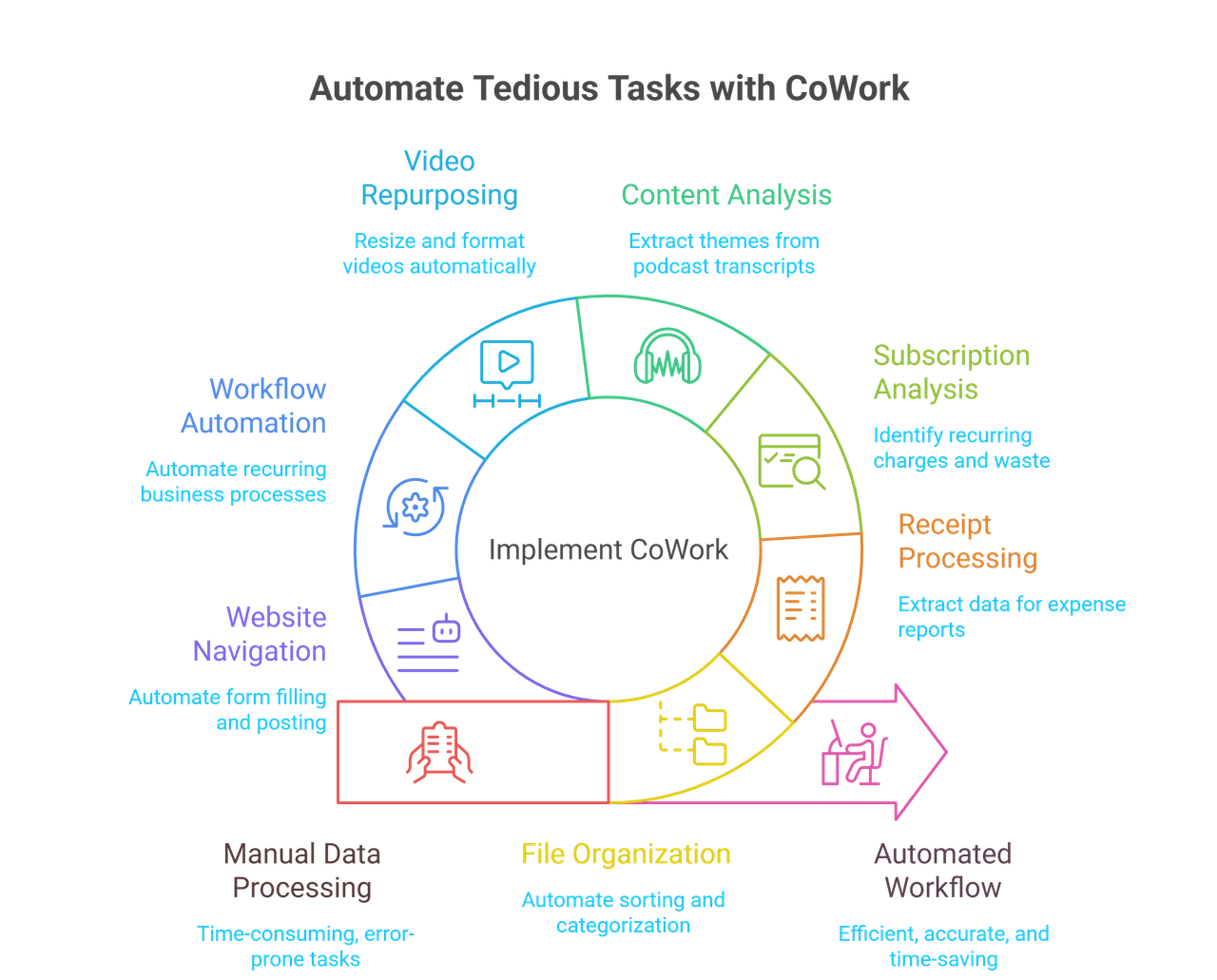
The simplest use case solves a universal problem: chaotic Downloads folders. Drop CoWork onto your desktop and ask it to "organize my Downloads by type and date." It scans hundreds of files, analyzes content and context, creates meaningful folder structures, and categorizes everything—tasks that would take hours manually completed in minutes.
Receipt processing showcases practical business value. Drop screenshots of receipts into a folder. Ask CoWork to create an expense spreadsheet. It reads receipt contents, extracts vendor names, amounts, dates, and categories, then generates an Excel file with working formulas for totals and summaries. No manual data entry required.
One particularly high-ROI workflow: analyzing credit card statements for subscription waste. Users upload statements and ask CoWork to identify recurring charges, categorize subscriptions, and flag unused services. In minutes, it exposes forgotten tools and expensive subscriptions quietly draining cash. Many users report this single use case pays for the tool itself.
Content Creation and Analysis
Lenny Rachitsky tested CoWork with a substantial challenge: analyzing 320 podcast transcripts to extract key themes for product builders. The task: "Go through every Lenny's Podcast episode and pull out the 10 most important themes and lessons for product builders. Then give me the 10 most counterintuitive truths."
CoWork processed the entire corpus, identified patterns across hundreds of hours of content, and delivered structured insights. The kind of analysis that would require weeks of manual work happened autonomously.
Content creators use CoWork for video repurposing—taking long-form videos, identifying high-conversion segments, resizing and cropping for platform-specific formats (LinkedIn, Twitter), adding audio tracks, and compressing to meet upload specifications. Workflows that previously required manual video editing tools now execute with a single instruction.
Workflow Automation and Business Intelligence
Agile practitioners are finding creative applications. A Scrum Master can point CoWork at six months of Sprint Retrospective notes and ask it to identify recurring themes across various formats—PNGs of sticky notes, CSV files from Jira exports, text documents. Pattern analysis across heterogeneous data sources that would be tedious manually becomes automated insight generation.
Product managers provide CoWork access to customer feedback files, roadmap documents, and product backlogs, then request analysis of which backlog items address the most frequent complaints. The output? A weekly status report for stakeholders generated automatically from scattered data.
When paired with Claude in Chrome, CoWork can navigate websites, fill forms, click buttons, extract information, and complete posting workflows. After generating social-ready content, it can log into platforms and distribute posts—removing friction from content distribution pipelines.
The Productivity Multiplier Effect
One user documented building a startup MVP in a single session. CoWork created comprehensive pitch decks with market research, competitive analysis, product feature specifications, team descriptions, and financial projections. Work that traditionally requires weeks reduced to hours.
An Agile coach processed 142 curriculum files (textClipping formats, PDFs, Markdown documents) by asking CoWork to organize by use case, convert formats, create an indexed catalog with tags, and map each prompt to course modules. The task hit API limits mid-execution (infrastructure still scaling to demand), but the principle held: complex data organization tasks become delegatable.
The pattern is consistent: CoWork excels at methodical, multi-step tasks that are tedious for humans but straightforward to automate. File manipulation, data extraction, format conversion, structured analysis, and repetitive workflows.
The Technical Reality: What CoWork Actually Does
Understanding CoWork's capabilities requires understanding its architecture and constraints.
The Virtualization Approach
CoWork doesn't run directly on your Mac. It operates inside a virtual machine using Apple's Virtualization Framework. Anthropic downloads and boots a custom Linux root filesystem. Your selected folder gets mounted into this VM environment.
This approach provides security benefits. The VM restricts network access. CoWork can't reach arbitrary websites or services—only specifically whitelisted endpoints (primarily the Anthropic API itself). The isolation theoretically prevents CoWork from accessing files outside designated folders or making unauthorized network calls.
The downside? Processing happens locally, consuming your computer's resources. Complex tasks require the Claude Desktop app to remain open. Close the app, and your session ends. Battery consumption matters. Anthropic enforces usage quotas to prevent system drain.
Connector Integration and Skills
CoWork doesn't work in isolation. It integrates with third-party services through Connectors—links to Asana, Notion, Canva, Linear, Google Workspace, and more. When configured, CoWork can pull data from project management tools, push updates to documents, and maintain context across your workflow.
The Claude in Chrome extension expands capabilities further. With browser access, CoWork can navigate webpages, check email inboxes, summarize urgent messages, prioritize action items, and automate web-based workflows.
Skills represent another layer—specialized capabilities for working with Excel (generating files with formulas and conditional formatting), creating presentations, following brand guidelines, and handling specific document types.
The Learning Mechanism
One of CoWork's most powerful features is workflow recording. Perform a task once while recording enabled. CoWork captures each action—clicks, form fills, navigation patterns. Save the recording as a shortcut. Now you can replay the entire workflow with a single command or schedule it as a recurring task.
This teaching mechanism allows CoWork to learn precisely how you work, adapting to your tools and preferences rather than relying on generic automation templates.
| Area | How CoWork Actually Works |
|---|---|
| Execution Environment | CoWork runs inside a secure Linux virtual machine using Apple’s Virtualization Framework. Your chosen folder is mounted into this VM, while the rest of your system remains isolated. |
| Security & Isolation | The VM restricts network access and file access. Only whitelisted endpoints (mainly Anthropic APIs) are allowed. It cannot access files outside your selected folders. |
| Resource Usage | All processing happens locally on your Mac. Closing Claude Desktop stops the session. Heavy tasks increase CPU, RAM, and battery usage. Quotas are enforced to prevent overload. |
| Connectors | Integrates with tools like Asana, Notion, Canva, Linear, and Google Workspace. CoWork can pull data, update documents, and keep project context in sync. |
| Browser Automation | With the Claude in Chrome extension, CoWork can navigate websites, read emails, summarize messages, and automate browser-based workflows. |
| Skills | Pre-built capabilities for Excel generation, presentations, brand guidelines, structured documents, and domain-specific automation. |
| Workflow Learning | Records your actions (clicks, navigation, form fills) and saves them as shortcuts. These workflows can be replayed instantly or scheduled as recurring automations. |
The Limitations Nobody Mentions
Enthusiasm around CoWork is high, but real-world usage reveals significant constraints.
Platform and Accessibility Restrictions
CoWork is macOS exclusive. No Windows, Linux, or mobile support currently exists. Anthropic confirmed a Windows version is in development, targeted for mid-2026, but enterprise adoption will remain limited until cross-platform support exists.
The $20/month Pro plan provides access, but power users report hitting usage limits quickly. Complex tasks burn through quotas rapidly. The $100-$200/month Max plans offer higher limits, but even Max 20x subscribers encounter throttling during intensive work periods.
Connector Reliability Issues
Multiple users report that external connectors—Gmail, Google Drive, third-party apps—don't work reliably. The Chrome extension integration performs better but isn't perfect. Expected behaviors fail unpredictably. Workflows that work one day encounter errors the next.
Anthropic's documentation acknowledges this reality: "CoWork is a research preview with unique risks." Translation: expect bugs, inconsistent performance, and incomplete features.
Memory and Context Limitations
Unlike some AI tools that remember context over time, CoWork starts fresh each session. Your accumulated knowledge, preferences, and workflow patterns don't persist. You can't currently use CoWork within Claude Projects, limiting organizational options for complex, ongoing work.
For tasks requiring continuity—ongoing projects, evolving documentation, iterative development—this limitation proves frustrating. Each session requires re-establishing context, re-explaining preferences, and re-teaching workflows.
The Scope of Appropriate Tasks
CoWork handles specificity well but struggles with ambiguity. It excels at methodical execution of clearly defined workflows. It's less effective for creative, nuanced work requiring subjective judgment.
The tool works brilliantly for:
- Organizing files by consistent rules
- Extracting data from structured formats
- Creating documents from templates
- Automating repetitive multi-step processes
It struggles with:
- Open-ended creative tasks
- Work requiring current external knowledge
- Complex reasoning across disconnected domains
- Tasks needing real-time collaboration
Understanding this scope prevents frustration and helps identify where CoWork adds genuine value versus where it creates friction.
- A user connects CoWork to a confidential folder
- An attacker places a malicious file inside
- The user asks CoWork to analyze the files
- Hidden instructions trigger malicious execution
- The largest file is exfiltrated via the Anthropic API
- Access to private data
- Exposure to untrusted content
- Ability to communicate externally
The Technical Improvements (And Why They're Not Enough)
Reinforcement learning trains Claude to refuse malicious instructions.
Scans for hidden text, deceptive UI, and embedded adversarial commands.
Runs in a restricted VM limiting network access.
Requests approval before destructive actions.
The Real-World Implications
The security concerns aren't theoretical. CoWork's design encourages users to grant access to their working environments—the folders where they keep drafts, financial documents, client data, and proprietary information.
"Skill" files are already being shared online. Users download these to enhance CoWork's capabilities. But malicious actors can disguise prompt injections as helpful skills. The average office worker won't recognize the difference.
Dr. Margaret Cunningham, Vice President of Security and AI Strategy at Darktrace, emphasized: "People with strong technical literacy know how to sandbox agents or avoid risky connectors. Non-technical users don't usually understand how to do this, and CoWork is targeted at non-technical users."
This is the fundamental tension: the tool marketed toward general office workers requires security awareness typically found only in technical professionals.
The Competitive Landscape: What CoWork Means for the Industry
CoWork doesn't exist in isolation. Its launch signals broader shifts in how AI companies compete and what capabilities become table stakes.
The Microsoft Copilot Challenge
CoWork competes directly with Microsoft's Copilot for enterprise productivity. Microsoft's approach integrates AI across existing Office 365 tools—Word, Excel, Outlook, Teams. Copilot works within familiar interfaces, leveraging Microsoft's existing enterprise relationships.
Anthropic's strategy differs. Rather than integrating into established productivity suites, they built a standalone agent with broader capabilities. CoWork isn't limited to Microsoft's ecosystem—it works with files regardless of format, integrates with third-party tools through connectors, and operates at the desktop level rather than within specific applications.
This approach offers flexibility but requires users to adopt new workflows. The question becomes: will users prefer AI embedded in existing tools or more powerful standalone agents that require behavioral change?
The Startup Extinction Threat
Fortune reported that CoWork's launch "could threaten dozens of startups." The concern is real. CoWork's capabilities—file organization, document generation, data extraction, workflow automation—overlap substantially with specialized AI startups that have raised funding to solve these specific problems.
If foundational AI labs bundle agent capabilities into their core products, the value proposition for single-purpose AI tools diminishes. Why pay for a dedicated receipt-scanning app when CoWork handles it alongside everything else?
For startups building on top of Claude or other large language models, the threat is existential. The platforms they depend on may become their competitors.
The Race Toward Agentic AI
Simon Willison, a respected voice in the AI community, predicted: "I would be very surprised if Gemini and OpenAI don't follow suit with their own offerings in this category."
CoWork validates a product direction. Claude Code proved developers would use AI agents for real work. CoWork democratizes that capability for non-technical users. Competitors will respond.
Google's Gemini and OpenAI's GPT will likely introduce similar general-purpose desktop agents in 2026. The race is on to define what "AI coworker" means and capture user trust before alternatives saturate the market.
Should You Actually Use CoWork in 2026?
The honest answer depends on your risk tolerance and use cases.
When CoWork Makes Sense
For individual productivity on non-sensitive tasks: If you're organizing personal files, processing receipts, creating presentations, or analyzing non-confidential data, CoWork delivers genuine value. The time savings are real. Users consistently report tasks that took hours now complete in minutes.
For experimentation and learning: CoWork represents the cutting edge of agentic AI. Early adopters who experiment now will understand the technology before it becomes mainstream. That knowledge advantage matters as the industry evolves.
For workflows with clear, repeatable patterns: If you can articulate exactly what you want done, CoWork executes reliably. The more specific your instructions, the better the results. Tasks like "rename all files in this format," "extract data from these images into a spreadsheet," or "create a summary document from these notes" work excellently.
When to Avoid CoWork
For regulated industries or sensitive data: If you work in healthcare, finance, legal, or any field with strict data handling requirements, CoWork's security model presents unacceptable risks. Anthropic explicitly states: "Do not use CoWork for regulated workloads."
For mission-critical business operations: CoWork remains a research preview. Expect bugs, inconsistent performance, and breaking changes. Production workflows requiring reliability should wait for stable releases.
If you can't invest time in learning: CoWork requires experimentation to use effectively. Understanding what it handles well, where it struggles, and how to structure requests takes practice. If you need immediate productivity without a learning curve, traditional tools may serve better.
For teams requiring audit trails and compliance: CoWork activity doesn't appear in Audit Logs, Compliance API, or Data Exports. Organizations with governance requirements can't use CoWork within existing compliance frameworks.
The Pragmatic Approach
If you decide to use CoWork, follow security best practices:
Create dedicated working folders: Never grant CoWork access to your entire Documents folder or sensitive directories. Create specific folders for CoWork tasks, move only necessary files there, and maintain backups elsewhere.
Start with test data: Before using CoWork on real work, experiment with dummy files. Understand how it behaves, what mistakes it makes, and where manual review is essential.
Limit connector access: Enable only the connectors you actively need. Broader integrations increase attack surface without adding value if you're not using them.
Review outputs carefully: CoWork can make mistakes, especially if instructions are ambiguous. Always verify generated spreadsheets, created documents, and automated actions before relying on them.
Watch for Windows release: If you're not on Mac, wait for cross-platform support rather than switching ecosystems for a research preview tool.
What's Coming Next
Anthropic has confirmed several developments:
The Bigger Picture: AI That Does, Not Just Talks
CoWork represents an inflection point. For years, AI has been getting smarter at answering questions, generating text, and creating images. But it remained fundamentally reactive—waiting for human prompts, producing outputs that humans then had to copy, paste, edit, and integrate into workflows.
Agentic AI changes this dynamic. Tools like CoWork don't just produce outputs—they take action. They operate semi-autonomously, make decisions within constrained parameters, and complete workflows end-to-end.
This shift from conversational AI to agentic AI mirrors the difference between a consultant who gives advice and an employee who executes tasks. The implications ripple across knowledge work.
The Productivity Promise
If the security concerns can be adequately addressed, the productivity gains are transformative. Imagine:
- Administrative assistants handling 10x the workload
- Analysts processing data without tedious manual extraction
- Marketers creating content pipelines that run autonomously
- Project managers generating status reports from scattered information sources
The "glue work" that connects different software, formats, and workflows—the copy-pasting, reformatting, and data shuttling that consumes hours daily—becomes automated.
One estimate suggests agentic AI could deliver a 100x productivity increase for specific administrative and analytical roles. That's not hyperbole if CoWork-like tools mature to handle the full scope of repetitive knowledge work tasks.
The Job Displacement Conversation
Anthropic emphasizes CoWork as a "coworker," not a replacement. But the economics tell a different story. If one knowledge worker with CoWork can accomplish what required a team, headcount projections change.
This isn't new. Every major productivity tool—spreadsheets, databases, word processors—eliminated roles while creating new ones. The question isn't whether agentic AI displaces jobs (it will) but whether the new roles created offset those lost and whether transition support exists for displaced workers.
The honest conversation requires acknowledging both sides: genuine productivity gains that benefit businesses and workers who adapt, and real disruption for roles that become automatable.
The Trust Threshold
The technology works. The use cases are real. The productivity gains are measurable. But trust remains the gating factor.
Will users trust AI with access to their files, business data, and digital workflows when security researchers demonstrate exfiltration vulnerabilities? Will enterprises adopt tools that explicitly disclaim responsibility for agent actions?
The answer depends on whether security improves faster than adoption grows. If CoWork reaches mainstream usage before vulnerabilities are fully addressed, a high-profile breach could set the entire agentic AI category back years.
Conversely, if Anthropic (and competitors) prioritize security, implement robust defenses, and build gradual trust through careful deployment, agentic AI could become as ubiquitous as cloud storage within a few years.
Final Thoughts: The Future of Work Is Delegating to AI
Claude CoWork isn't perfect. The security concerns are real. The limitations are significant. The reliability issues are frustrating.
But it represents something genuinely new: AI you can delegate work to, not just converse with.
The experience of describing a task, walking away, and returning to finished work feels different than any previous AI interaction. It shifts the relationship from tool to coworker, from assistant to agent.
Whether CoWork specifically succeeds matters less than the category it pioneered. Agentic AI for general knowledge work is coming. Google, Microsoft, OpenAI, and others will build competing products. The capabilities will improve. The security will mature. The reliability will increase.
The question isn't whether AI agents become part of our workflows. They will. The question is how quickly, how safely, and who benefits.
For developers, product managers, and knowledge workers willing to experiment with emerging technology, CoWork offers a glimpse of that future today—bugs, security risks, and all.
Just remember: it's still a research preview. Treat it accordingly. Don't trust it with your most sensitive data. Maintain backups. Review outputs. And stay informed as the technology evolves.
The AI that does your work is here. Whether it's ready for your work is a decision only you can make.
References and Sources
This article was researched using verified sources from January 2026. Below are the key references:
Official Anthropic Documentation
- Anthropic Help Center - "Getting Started with Cowork" - https://support.claude.com/en/articles/13345190-getting-started-with-cowork
- Anthropic Help Center - "Using Cowork Safely" - https://support.claude.com/en/articles/13364135-using-cowork-safely
- Anthropic Research - "Mitigating the risk of prompt injections in browser use" - https://www.anthropic.com/research/prompt-injection-defenses
Industry Analysis and News Coverage
- Simon Willison's Newsletter - "First impressions of Claude Cowork, Anthropic's general agent" - https://simonw.substack.com/p/first-impressions-of-claude-cowork
- Fortune - "Anthropic launches Cowork, a file-managing AI agent that could threaten dozens of startups" (January 13, 2026) - https://fortune.com/2026/01/13/anthropic-claude-cowork-ai-agent-file-managing-threaten-startups/
- TechCrunch - "Anthropic's new Cowork tool offers Claude Code without the code" (Russell Brandom, January 12, 2026) - https://techcrunch.com/2026/01/12/anthropics-new-cowork-tool-offers-claude-code-without-the-code/
- Engadget - "Anthropic opens up its Claude Cowork feature to anyone with a $20 subscription" (January 16, 2026) - https://www.engadget.com/ai/anthropic-opens-up-its-claude-cowork-feature-to-anyone-with-a-20-subscription-194000021.html
- Axios - "Anthropic's Claude Cowork wrote itself" (Megan Morrone, January 13, 2026) - https://www.axios.com/2026/01/13/anthropic-claude-code-cowork-vibe-coding
- PYMNTS - "Anthropic Cowork Turns Claude Into Hands-On Collaborator" (January 14, 2026) - https://www.pymnts.com/news/artificial-intelligence/2026/anthropic-introduces-cowork-turn-claude-into-collaborator/
Technical Implementation Guides
- Elephas Blog - "Claude Cowork Use Cases, Best Practices and Comprehensive Guide (2026)" - https://elephas.app/blog/claude-cowork-comprehensive-guide
- Superframeworks Blog - "Claude Cowork Guide 2026: Use Cases, Limitations & Alternatives" - https://superframeworks.com/blog/claude-cowork-guide-alternatives
- UC Strategies - "7 Insane Claude Cowork Use Cases That Show the Future of Office Work" - https://ucstrategies.com/news/7-insane-claude-cowork-use-cases-that-show-the-future-of-office-work/
- UC Strategies - "Claude Co-work Explained: How to Go from Beginner to Power User in Under 20 Minutes" - https://ucstrategies.com/news/claude-co-work-explained-how-to-go-from-beginner-to-power-user-in-under-20-minutes/
- DEV Community - "Cowork: Claude Code for the Rest of Your Work" - https://dev.to/sivarampg/cowork-claude-code-for-the-rest-of-your-work-3hjp
Real-World Case Studies
- Age-of-Product - "Claude Cowork for Agile Practitioners" - https://age-of-product.com/claude-cowork/
- Geeky Gadgets - "Claude Cowork Quickly Turns Tasks into Results: 7 Days of Work in 15 Minutes" (January 16, 2026) - https://www.geeky-gadgets.com/anthropic-claude-cowork-2026/
- Leanware Insights - "Claude Cowork: Why It's Changing the Way We Work" - https://www.leanware.co/insights/claude-cowork-ai-productivity
- Generation Digital - "Claude Cowork: Anthropic's agentic desktop AI (2026)" - https://www.gend.co/blog/anthropic-claude-cowork
Security Research and Vulnerability Analysis
- PromptArmor - "Claude Cowork Exfiltrates Files" - https://www.promptarmor.com/resources/claude-cowork-exfiltrates-files
- The Register - "Anthropic's Files API exfiltration risk resurfaces in Cowork" (January 15, 2026) - https://www.theregister.com/2026/01/15/anthropics_claude_bug_cowork/
- The Decoder - "Claude Cowork hit with file-stealing prompt injection days after Anthropic's launch" (January 17, 2026) - https://the-decoder.com/claude-cowork-hit-with-file-stealing-prompt-injection-days-after-anthropics-launch/
- Neuronad AI News - "Claude Cowork - The Spy in the Sandbox: How He Can Be Tricked into Stealing Your Files" (January 15, 2026) - https://neuronad.com/ai-news/tech/claude-cowork-the-spy-in-the-sandbox-how-he-can-be-tricked-into-stealing-your-files/
- ByteIota - "Claude Cowork Security: Non-Zero Attack Risk Warning" (January 16, 2026) - https://byteiota.com/claude-cowork-security-non-zero-attack-risk-warning/
- TechNadu - "Anthropic Claude Vulnerability Exposes Cowork AI to Data Exfiltration via Prompt Injection" (Lore Apostol, January 16, 2026) - https://www.technadu.com/anthropic-claude-vulnerability-exposes-cowork-ai-to-data-exfiltration-via-prompt-injection/618384/
Additional Coverage
- AI Base News - "Claude Cowork Launches Self-Boot in Two Weeks, 46 Million People Watch the AI Office Revolution" - https://news.aibase.com/news/24692
Disclaimer: This article represents an analysis of publicly available information as of January 23, 2026. Claude CoWork is a research preview with ongoing development. Features, security measures, and availability may change. Always refer to Anthropic's official documentation for the most current information.
Join the Verse
Get exclusive insights on Next.js, System Design, and Modern Web Development delivered straight to your inbox.
No spam. Unsubscribe at any time.