Building LLM Apps Without API Keys: A Deep Dive Using TextxGen
TextxGen is a Python package providing seamless access to 50+ LLMs including GPT-5, Gemini 2.0, and Grok 4.1 with no API key required.

Sohail Shaikh
Author
TextxGen: Simple Python Package for LLM Integration
Working with Large Language Models shouldn't require juggling API keys, managing authentication flows, or wrestling with different provider interfaces. That's the philosophy behind TextxGen—a Python package that gives you instant access to over 50 powerful AI models through a clean, unified API.
What is TextxGen?
TextxGen is a Python package designed for developers who want to integrate LLM capabilities without the usual complexity. It provides two main interaction patterns: chat-based conversations for building assistants and chatbots, and text completions for generation tasks like writing, coding, and summarization.
The standout feature? No API key required. TextxGen uses a predefined internal key, letting you start experimenting immediately without signing up for multiple services or managing credentials.
Key Features:
- Access to 50+ models including GPT-5 Nano, Gemini 2.0 Flash, Grok 4.1, DeepSeek Chat, and more
- Unified interface for both chat and completion endpoints
- Built-in streaming support for real-time responses
- Robust error handling and validation
- Zero authentication setup—works out of the box
Installation
Getting started takes seconds:
Or clone from GitHub:
That's it. No API keys to configure, no environment variables to set.
Quick Start: Chat Example
Here's how you build a conversational AI in under 10 lines:
The ChatEndpoint maintains conversation context, making it ideal for multi-turn interactions. System prompts let you define the assistant's personality and behavior upfront.
Quick Start: Text Completion
For single-shot generation tasks, use the CompletionsEndpoint:
This pattern works great for code generation, content creation, or any task where you need a single coherent output.
Streaming Responses
Real-time streaming creates more responsive user experiences. Both endpoints support it:
Chunks arrive as they're generated, so users see progress immediately instead of waiting for the entire response.
Available Models
TextxGen provides access to over 50 models across different sizes and specializations. Here are some highlights:
Fast General-Purpose Models:
grok4.1_fast– xAI's real-time reasoning model trained on live web datagemini_2.5_flash_lite– Extremely fast, low-cost Google modelgpt_4.1_nano– Compact GPT-4 family model for lightweight tasks
Coding Specialists:
deepseek_chat_v3_1– Strong reasoning and coding supportqwen3_coder– Optimized for debugging and code generationdevstral_small_2505– Built for repo understanding and software agents
Large Context Models:
kimi_48b– Long-context bilingual model for research taskslongcat_flash_chat– Document-aware multi-turn conversations
Creative & Roleplay:
cydonia_24b– Expressive writing and storytellingunslopnemo_12b– Emotionally expressive conversational tone
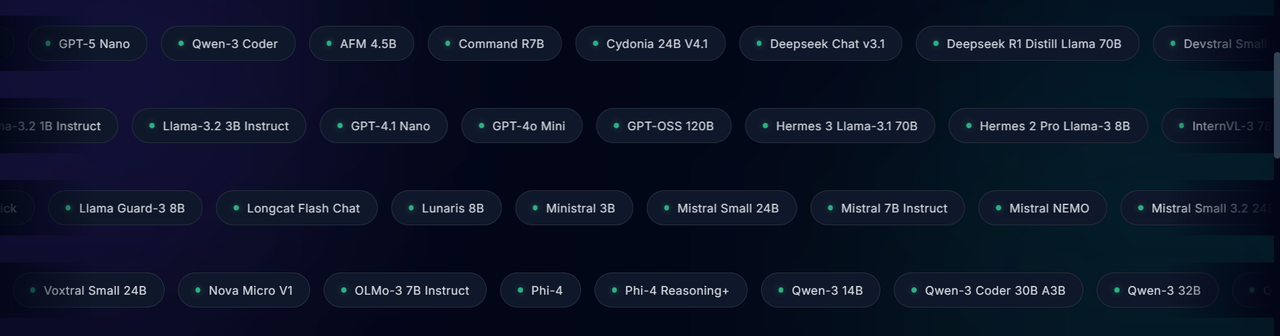
For the complete list of 50+ supported models, check the GitHub repository.
API Control Parameters
Fine-tune model behavior with these parameters:
- temperature (0.0-1.0): Controls creativity. Lower = focused, higher = creative
- max_tokens: Limits response length
- top_p: Nucleus sampling for diversity control
- stop: Sequences that end generation
- n: Number of completions to generate
Example with multiple parameters:
Use Cases
Chatbots & Virtual Assistants
Build conversational interfaces with maintained context and custom personalities through system prompts.
Code Generation & Debugging
Leverage coding-specialized models like DeepSeek and Qwen Coder for generating functions, explaining code, or debugging.
Content Creation
Generate articles, marketing copy, social media posts, or creative writing with models optimized for expression.
Research & Analysis
Use long-context models like Kimi 48B to process documents and generate comprehensive summaries.
Rapid Prototyping
The zero-setup nature makes TextxGen perfect for MVPs, hackathons, and quick experiments.
Why TextxGen?
Simplicity: No authentication complexity. Install and start using immediately.
Flexibility: 50+ models covering different specializations, sizes, and capabilities. Switch models with a single parameter change.
Unified Interface: One API for chat and completions, regardless of the underlying model. Learn once, use everywhere.
Production-Ready: Built-in error handling, streaming support, and sensible defaults make it reliable for real applications.
Open Source: MIT licensed and available on GitHub. Contributions welcome.
Getting Help
- Documentation: Full examples and API reference in the GitHub README
- Issues: Report bugs or request features on GitHub Issues
- PyPI Package: https://pypi.org/project/textxgen/
- Official Site: https://pystack.site/
Final Thoughts
TextxGen removes the friction from LLM integration. No API keys, no complex auth flows, no vendor-specific quirks. Just a clean Python interface to 50+ powerful models.
Whether you're building a production chatbot, experimenting with code generation, or just exploring what modern AI can do, TextxGen gets you started in seconds instead of hours.
Install it, try a few examples, and see how quickly you can go from idea to working prototype. That's the point—less configuration, more creation.
Resources:
Join the Verse
Get exclusive insights on Next.js, System Design, and Modern Web Development delivered straight to your inbox.
No spam. Unsubscribe at any time.